
Bump. Is there an error log or something I can find in the folder somewhere that might indicate where the problem is? Here it is Saturday night and the same thing happened again. I updated to the latest version, and still happening.
Yes this happens to me too, I often use a browser, conversing with listeners on Whats-app and in a chatroom. I did until recently used a midi controller but that but the remote start plugin has stopped recognising the midi tones, so I have been forced back to the keyboard shortcuts
My MIDI tones stopped working last week in Windows 11 thanks to the 2026-02 preview update which I've uninstalled and they are working again.
Maybe check your windows update history and check if you've installed KB5077241 as that breaks the MIDI service.
Hi Mark, thanks.
I hadn't installed 026-02 preview update KB5077241.
I had already looked at updates and I thought that PlayIt had worked since the most recent update KB5077181 was in installed on 15/02. Just in case I decided to remove KB5077181 and when PlayIT restarted the Remote Start plugin was again reading the midi tones.
To check I re-installed the update and on PlayIt start up I again got the error message about the Sanford midi failing and sure enough the midi tones aren't recognised in the plugin.
I have uninstalled KB5077181 again and the midi commands are working.
Perhaps Jason needs to take a look at this it appears the midi commands won't work an any updated versions of win11.
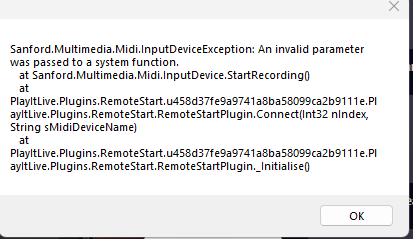
This is the error displayed on PlayIT startup
Ellie O'Brien
I've been using PlayIt for over 5 years for my live show on Saturday nights. For the last 4-5 weeks, something happens to my keyboard shortcuts - they all stop working within 15 minutes of the program. My keyboard shortcuts have always been set to GLOBAL, and have always worked just fine until recently. Also, I've never had any problem running another software along with PlayIt Live (ex. my virtual VU meters, Audacity for recording, etc) I think what triggers the error is when I adjust a level or something outside of Playit Live, but not always. Most times it just happens with no help from me. The only thing that fixes this is a reboot - not the software, but my whole PC which simply isn't an option when doing a live show. I have the microphone Push-to-Talk plugin and a shortcut key assigned to it. This has been so helpful on my show, ducking audio, triggering the next event, etc. but using the mouse is just inconvenient and this error is getting annoying. Anyone have this problem? Anyone know any fixes?